
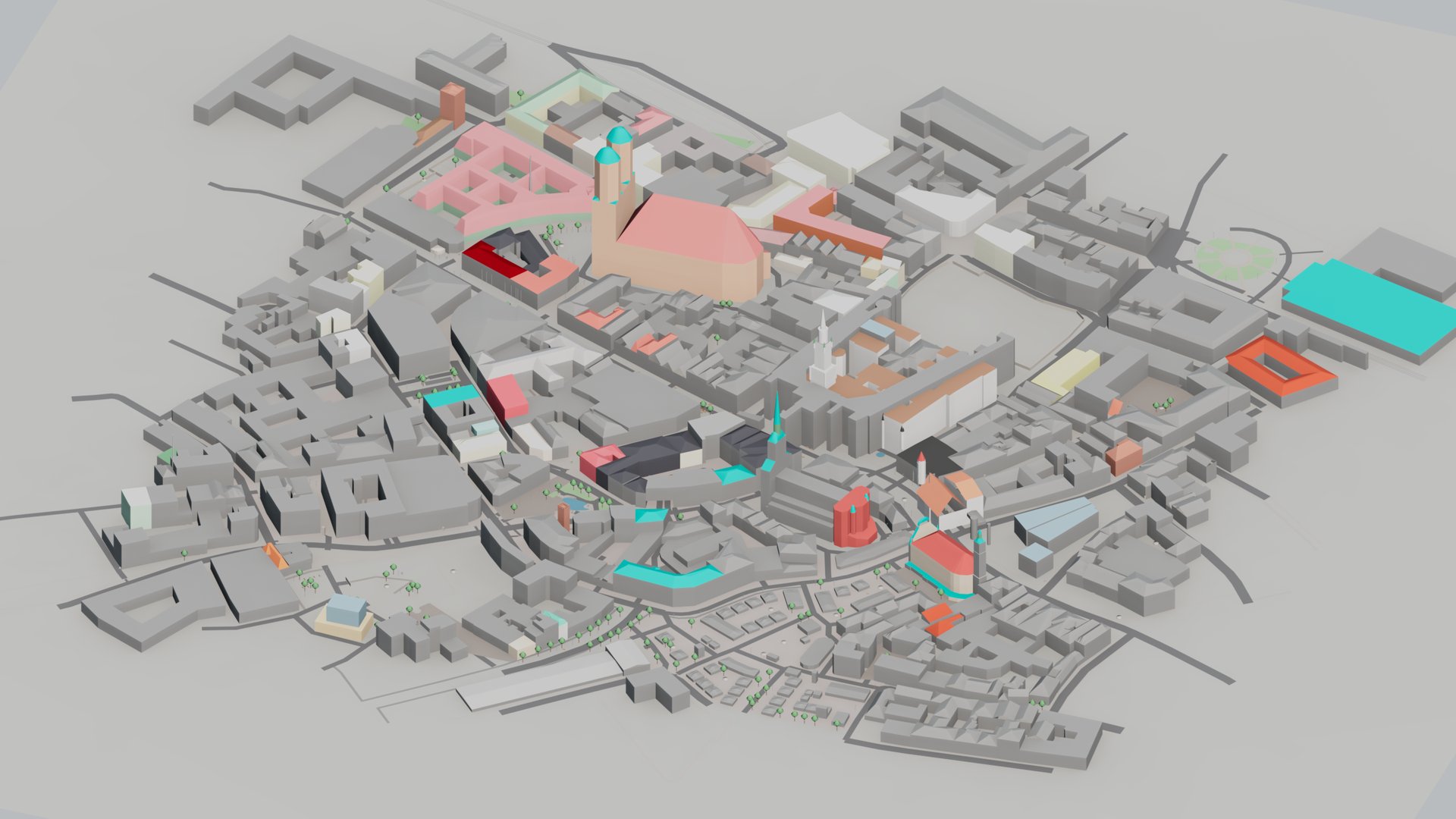
What comes in: the surrounding buildings, roads, water and trees
From the map, your scene gets:
- Buildings on their real footprints, at the heights the map gives, with courtyards, building parts (a tower on a podium, a block above an arcade), twelve roof shapes where the map records one, and colours from the map's colour and material tags.
- Roads at their mapped width, grouped by class, plus pavements, paths, steps and squares. Each road is a spline with a flat cross-section set to render, so it shows up in a render and still works as a spline for your own layout work.
- Ground as flat coloured patches: parks, grass, woods, water and car parks, with rivers and canals at their width.
- Trees, single and in avenue rows, as simple proxies sized from the map's height and crown where it records them.
- Walls, fences and hedges, railways and bridges, and street furniture: lamps, benches, fountains, monuments and power lines.
It is a block model: the walls are plain, with no windows.
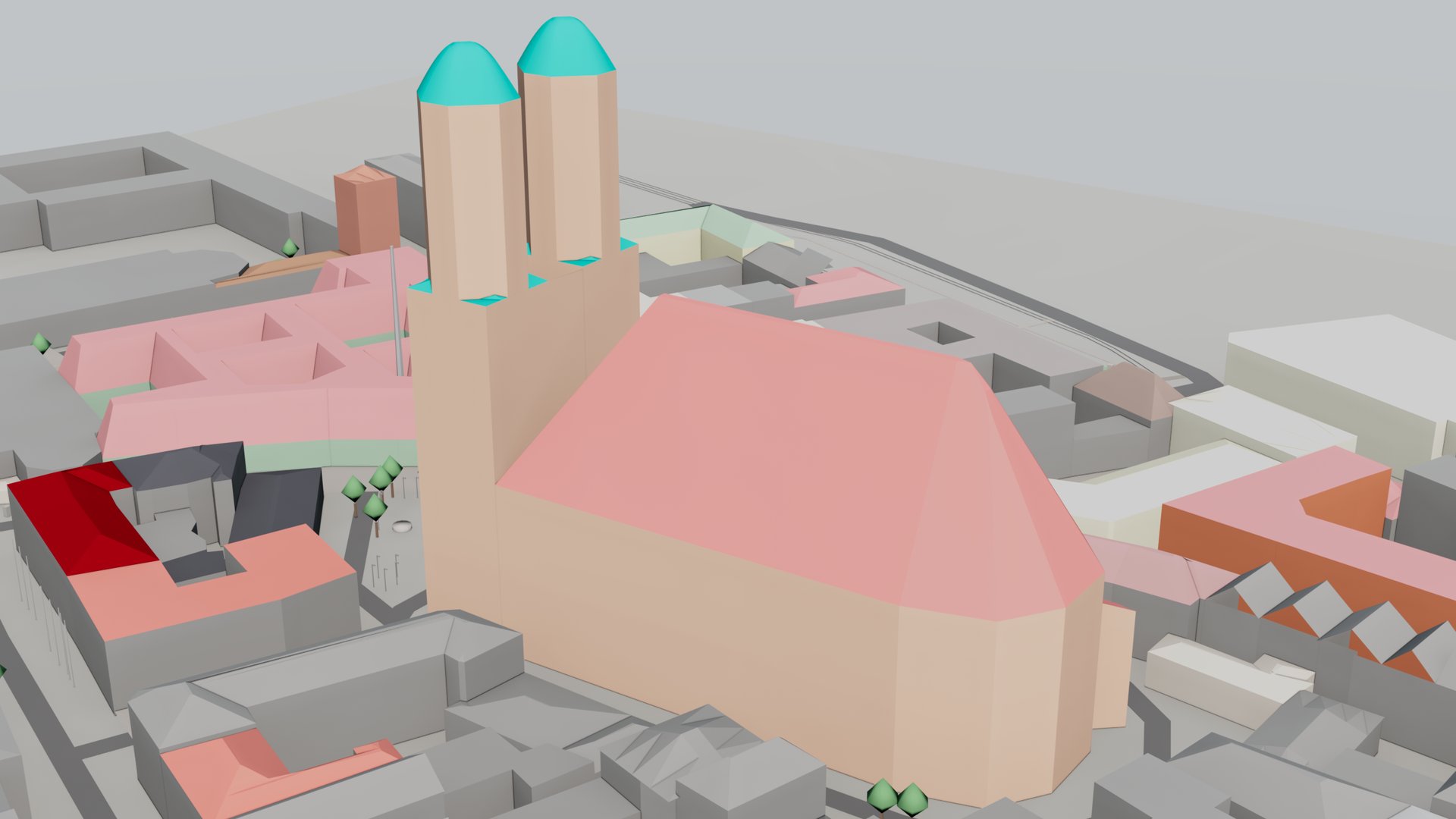
Roof shapes and building parts come from the map's own tags.
Want the textured city instead? See the 3D Tiles guide.
What you need
- Autodesk 3ds Max 2024–2027.
- ValTerra. The 30-day trial has every feature enabled; get it on the download page.
- A key for the globe: your own Google Maps Platform key or a Cesium ion token, under your own agreement with that provider. Read their terms before client work. You pick the area on the globe, and without a key it shows only a low-resolution world map, too coarse to pick an area by eye. The OpenStreetMap data and the terrain need no key.
Step by step: OpenStreetMap to 3ds Max
- Install ValTerra and open its panel.
- Paste your key or token into the field at the top of the right-hand column and press Save. The globe comes up.
- Type your site's address into the search bar above the globe and press Enter. Then press Select area and drag a rectangle around your site and the blocks you want around it.
- On the Import model tab, under Import as, choose Terrain + volumes + roads. The other choices bring in only part of it, such as only the roads or only the terrain.
- The line at the top of the tab shows the size of your selection; for an area above 4 km² it adds a rough estimate of time and memory. Press Import. Cancel import stops it at any point and leaves nothing in the scene.
- When it finishes, read the status line at the bottom of the panel: it says what was built and what the import had to assume.
Buildings sitting on real terrain, at the right scale
With terrain in the import (open elevation tiles, a DEM), buildings and roads are draped over the relief, so a street on a hillside climbs the hill. Without terrain, everything lies on one flat level at the height of the scene's ValTerra_Anchor, which is sea level when the city is the first import in the scene. For buildings at their real height, and on any slope, choose Terrain + volumes + roads.
Everything is built in metres and converted to your scene units, with true north along +Y. The scene is georeferenced through one helper: the first import places a ValTerra_Anchor holding the site's latitude, longitude and a reference height. Later imports share it, so a second area lands next to the first, and the cameras from your drone photos line up with it too. To turn the city to your project's own grid, rotate the anchor: everything imported is linked to it and turns with it, and later imports arrive already turned.
The scene is flat, laid on the Earth at the anchor, so the Earth's curve only matters far out: about 7.8 m of height at 10 km from the anchor, and much less closer in.
When the city is the first import in the scene, heights stay above sea level, so the city arrives at its real altitude: central Munich sits about 520 m above the grid. Zoom Extents brings it into view.
Missing building heights: reading the status line
Not every building in OpenStreetMap has a height. Where the map gives one, ValTerra uses it. Where it gives only the number of floors, each floor counts as 3.2 m. Where it gives neither, the building gets 8 m. In map terms: height or building:height first, then building:levels × 3.2 m, then a default 8 m. Roof shapes come from roof:shape, building parts from building:part, and colours from building:colour, roof:colour and building:material. Roads take their width from the map's width or lane count, otherwise from their class.
Each guess is counted by name in the status line: levels (707) means 707 buildings and building parts got their height from their number of floors, and default height (420) means 420 got the default 8 m. If you know a building's real height from your own survey, you can add it to OpenStreetMap yourself.
Schematic done: terrain 42x42(Terrain tiles by Mapzen / AWS Open Data (Terrarium));1097 building volumes, 170 building parts, 534 road ways,602 pavements and paths, 346 tree proxies,252 named objects, 367 shaped roofs, 144 ground patches, …;assumed: levels (707), path width from its kind (591),road width from its class (433), default height (420),crown width (302), …(Map data © OpenStreetMap contributors (ODbL)).The status line after a Munich city-centre import with ValTerra 0.6.10, shortened where you see "…". It names each assumption and how many times the import needed it.
Tidy layers, named objects and OpenStreetMap tags
Everything lands under one ValTerra layer, and the city has its own OSM group inside it: OSM MODEL (buildings), OSM ROADS, OSM PATHS, OSM GROUND, OSM TREES, OSM RAILS, OSM STREET (lamps, benches, monuments and power lines) and OSM WALLS. A layer appears only when the area has something for it. TERRAIN sits beside the group, so one eye on OSM hides the city and keeps the ground.
ValTerra 1├─ TERRAIN 1└─ OSM 0 ├─ OSM MODEL 297 ├─ OSM ROADS 20 ├─ OSM GROUND 44 ├─ OSM PATHS 31 ├─ OSM STREET 27 ├─ OSM RAILS 1 ├─ OSM TREES 2 └─ OSM WALLS 3The layers after the Munich import, with the number of objects on each. The one object on ValTerra is the ValTerra_Anchor, and the one on TERRAIN is the terrain mesh, VT_Terrain. Buildings without a name share merged objects, and OSM itself holds none: its objects sit on the layers inside it.
Many named features, such as the Feldherrnhalle in Munich, come in as objects with that name, so you can find them in the scene by name. A building the map draws as separate parts, such as the Frauenkirche, arrives without its name: its parts go into shared objects with neighbouring buildings. The address, operator, heritage listing and start date the map gives a feature are stored under Object Properties > User Defined, and every OpenStreetMap object carries the credit Map data © OpenStreetMap contributors (ODbL) there too.
OSM_name = FeldherrnhalleOSM_start_date = 1844OSM_heritage = 4OSM_wikidata = Q251712OSM_wikipedia = de:FeldherrnhalleOSM_addr_street = OdeonsplatzOSM_addr_city = MünchenOSM_addr_postcode = 80333OSM_building = yesOSM_tourism = attractionOSM_historic = yes…VT_OSM = Map data © OpenStreetMap contributors (ODbL)Object Properties > User Defined for the Feldherrnhalle after the Munich import, as ValTerra 0.6.10 writes it; two placement lines are left out.
A white block model of the city
Colours come in as ordinary materials, one per colour and finish, named VT_OSM_<finish>_<RRGGBB>; buildings the map gives no colour are plain grey (RGB 110, 110, 110). For white buildings, the plain massing look, there is no switch to find:
- Open Tools > Layer Explorer... and expand ValTerra, then OSM.
- Click the first layer inside OSM, then Shift+click the last one. If the ground should be white too, Ctrl+click TERRAIN.
- Right-click one of the highlighted layers and choose Select Objects From Selected Layers in the Layers quadrant of the menu. Highlight the layers inside OSM, not OSM itself: its objects sit on those layers, so OSM on its own selects nothing.
- Assign one white material to the selection.
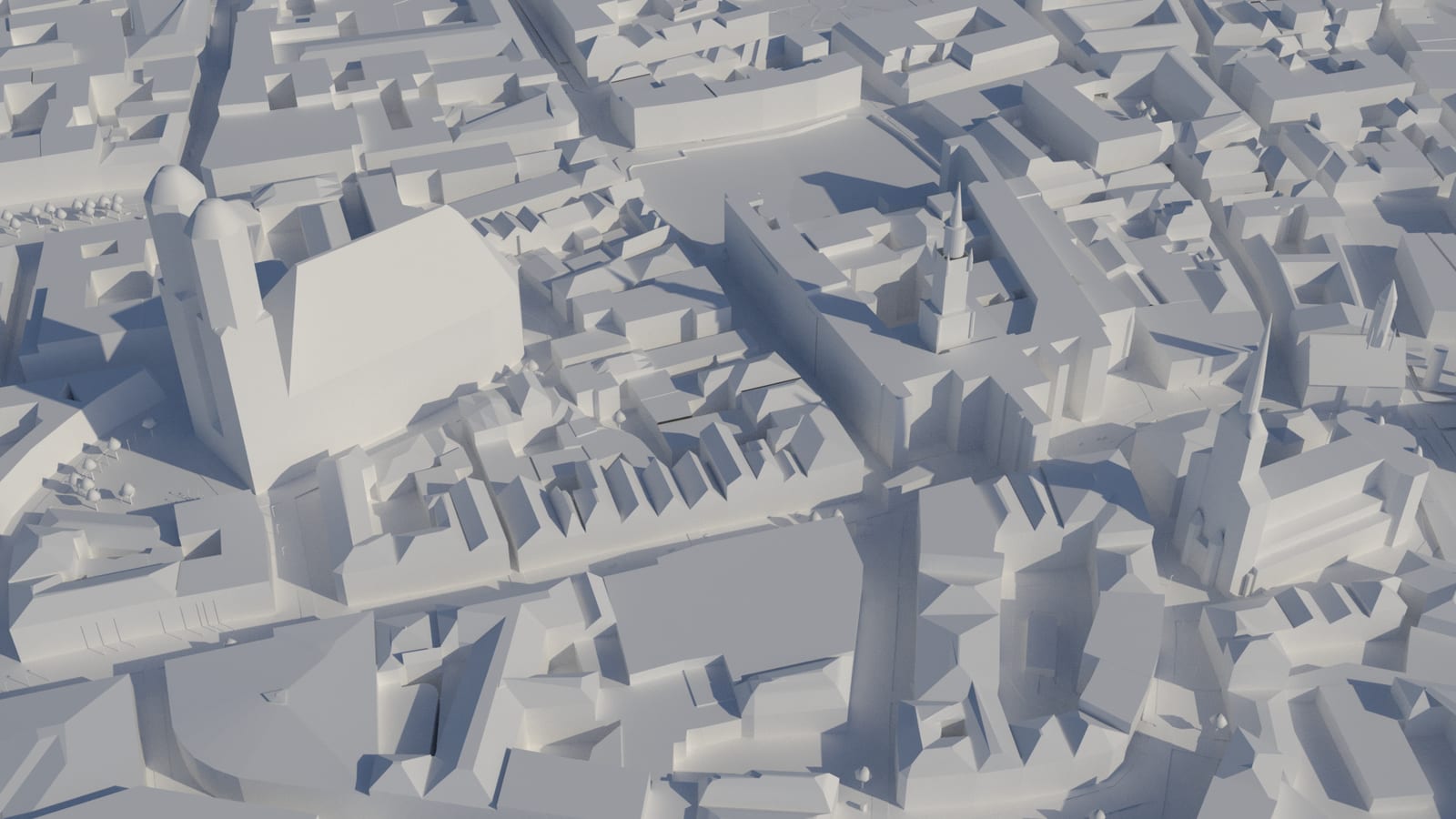
One white material on the OSM layers and TERRAIN gives a clean massing study.
© OpenStreetMap contributors. Terrain: Tilezen/Mapzen terrain tiles via AWS Open Data.
Add the sun for your site's date and hour to explore how the light falls on your plot: see sun position by date and time.
How big an area, and how heavy
- Areas above 4 km² are fetched in parts and joined into one city. For a very large area (above 50 km², or a very heavy download), ValTerra asks before it starts.
- A dense city centre takes about 0.165 GB of memory and 33 seconds of building time per km², plus the download.
- Terrain has no size limit.
- In ValTerra Lite, the free tier after the trial, each OpenStreetMap import covers up to 4 km². The trial and a paid seat have no fixed cap. See pricing.
Open data (ODbL) and the credit line
The buildings, roads and trees are OpenStreetMap data, published under the Open Database License (ODbL); the terrain comes from open elevation tiles. ValTerra writes the credit Map data © OpenStreetMap contributors (ODbL) into every OpenStreetMap object it creates, so the credit stays on the objects when the scene is merged or handed on. It does not add a credit to your renders.
What the license asks of you, and how to credit OpenStreetMap in your own images, is on OpenStreetMap's copyright page (opens in a new tab). Every source ValTerra uses is on our data sources & attribution page.
Questions about OpenStreetMap in 3ds Max
How do I get the real buildings around my site into 3ds Max without modelling them by hand?
Let ValTerra build them from OpenStreetMap: select the area on its globe, choose Terrain + volumes + roads and press Import.
How do I make a real city in 3ds Max, not a made-up one?
Start from the real one: ValTerra builds the buildings, streets, water and trees of the area you select from OpenStreetMap, at the heights the map knows, on real terrain.
How do I add a real location, with its surroundings, to a 3ds Max scene?
Type its address into the search bar above ValTerra's globe and select the area around it. The first import places a ValTerra_Anchor there, holding the latitude, longitude and a reference height of the place, and later imports line up with it. When the city is the first import, heights stay above sea level, so if the scene looks empty, Zoom Extents brings the place into view.
Is there a simple way to bring OpenStreetMap into 3ds Max?
Yes, inside 3ds Max itself: ValTerra builds the geometry straight in your scene, with no OBJ or FBX file to convert in between.
Does OpenStreetMap have building heights? What about buildings without one?
Many do. Those without a height get their number of floors × 3.2 m, or a default 8 m, and the status line counts each kind of guess.
Will the buildings and roads sit on the terrain, or float and sink?
With terrain in the import they are draped over the relief. Without it they lie on one flat level at the anchor's height, which is sea level when the city is the scene's first import.
Can I render the surrounding buildings plain white?
Yes: in the Layer Explorer, highlight the layers inside OSM, choose Select Objects From Selected Layers and assign one white material.
Will it come in at the right scale and facing true north?
Yes: metres converted to your scene units, true north along +Y, and every later import on the same anchor.
How big an area can I bring in? Will a whole district make my scene too heavy?
No fixed cap with the trial or a paid seat; Lite covers 4 km² per import. A dense centre takes about 0.165 GB of memory per km².
Do I need a key if the map data is open?
For the data, no. To see your site on the globe and pick the area by eye, yes: that needs your own Google Maps Platform key or a Cesium ion token, under your own agreement with that provider.
What credit do I show when I publish a render with the OpenStreetMap city?
The buildings, roads and trees are OpenStreetMap data under the Open Database License (ODbL), and that license, not ValTerra, sets the conditions for using them, including how to credit OpenStreetMap in published images. Read OpenStreetMap's copyright page (opens in a new tab) before client work. ValTerra writes Map data © OpenStreetMap contributors (ODbL) into every OpenStreetMap object it creates; it does not add a credit to your renders. Every source ValTerra uses is on our data sources & attribution page.
ValTerra is an independent product and is not affiliated with, endorsed by, or sponsored by Autodesk, Inc. or Google LLC.